



Cómo mejorar las escuelas con los Grupos Ed100

Anunciando Ed100 Groups
Me alegra anunciar Ed100 Groups, una nueva función que le permite usar Ed100 junto con otras personas en su escuela, PTA, clase universitaria, consejo escolar, grupo estudiantil u organización comunitaria.
Cualquier persona puede crear un grupo. Es gratis. No necesita permiso. ¡Pruébelo!
Haga clic en “Groups” en la parte superior de cualquier página de Ed100 para comenzar.
¿Por qué Groups?
Cuando algo cambia en una escuela de una manera que ayuda a los estudiantes a aprender, la historia puede tratarse de una persona. Cuando cambia un sistema escolar, es un tipo de historia diferente.
El cambio más allá de un solo salón de clases o escuela requiere coordinación. Y la coordinación requiere diálogo — entre educadores, padres, estudiantes y miembros de la comunidad. Para tomar prestada una frase de Hamilton, el cambio requiere personas que estén preparadas para estar “en la sala donde sucede”.
Ed100 Groups está diseñado para ayudar a las comunidades a crear esas condiciones bien fundamentadas — de manera intencional.
Cómo crear un Ed100 Group
Inicie sesión en Ed100. (Todo funciona mejor si lo hace primero).
Haga clic en Groups en la parte superior de cualquier página. (Si ya es miembro de uno o más grupos, los verá aquí).

Si no ha iniciado sesión, se le pedirá que lo haga. (Al registrarse en Ed100 usted acepta recibir correos electrónicos de nuestra parte — normalmente un mensaje informativo por semana).
Haga clic en Create new group.
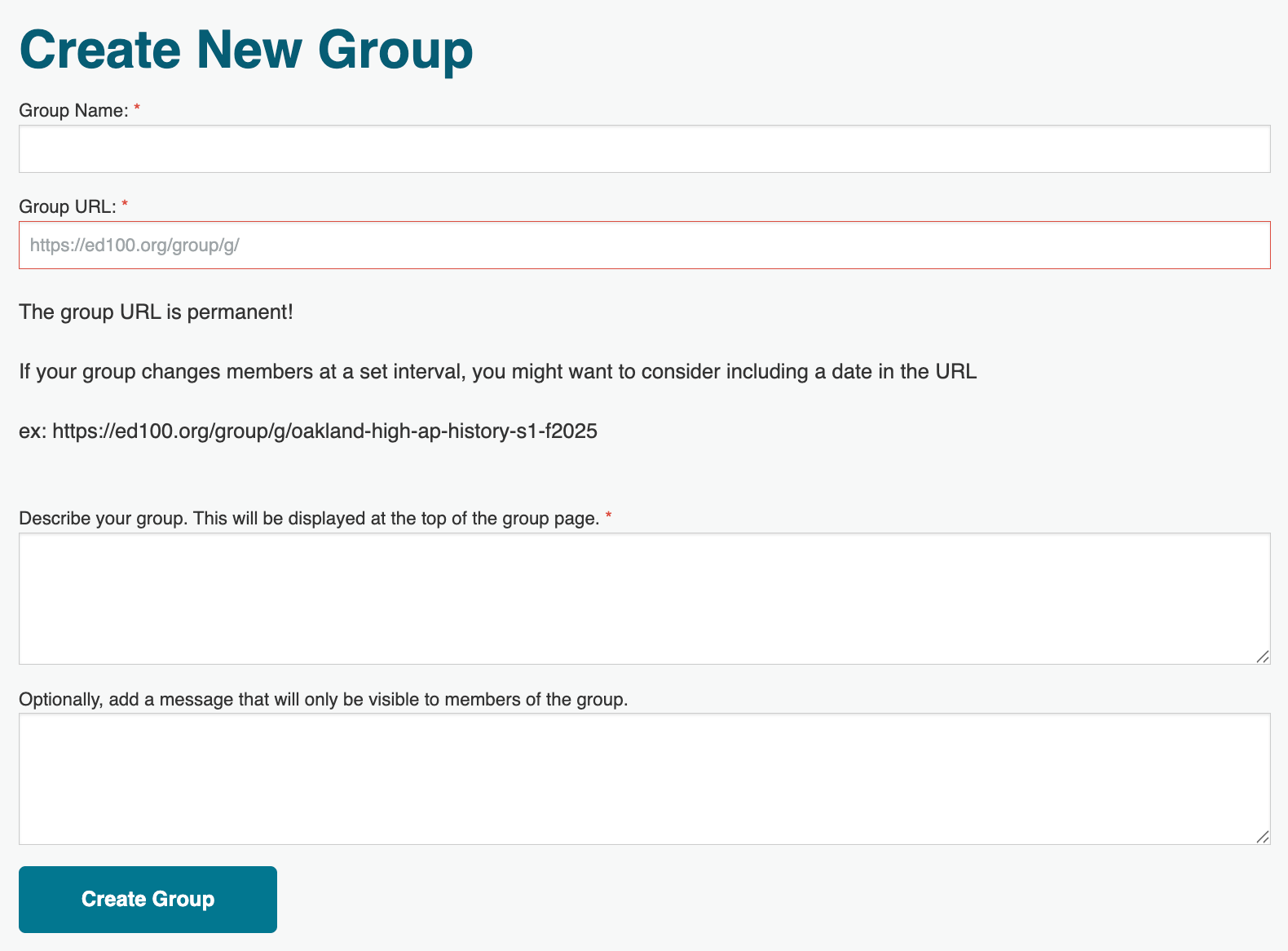
Asigne un nombre a su grupo y escriba una descripción. Agregue una extensión de URL para el grupo — será la dirección web permanente donde se encontrará el tablero de clasificación de su grupo en Ed100.
Como organizer del grupo, usted puede cambiar algunas configuraciones del grupo y crear un mensaje que será visible solo para los miembros del grupo. Puede cambiar todo esto más adelante (excepto la dirección URL del grupo).
Cómo invitar a personas
Después de crear su grupo, generará enlaces de invitación.
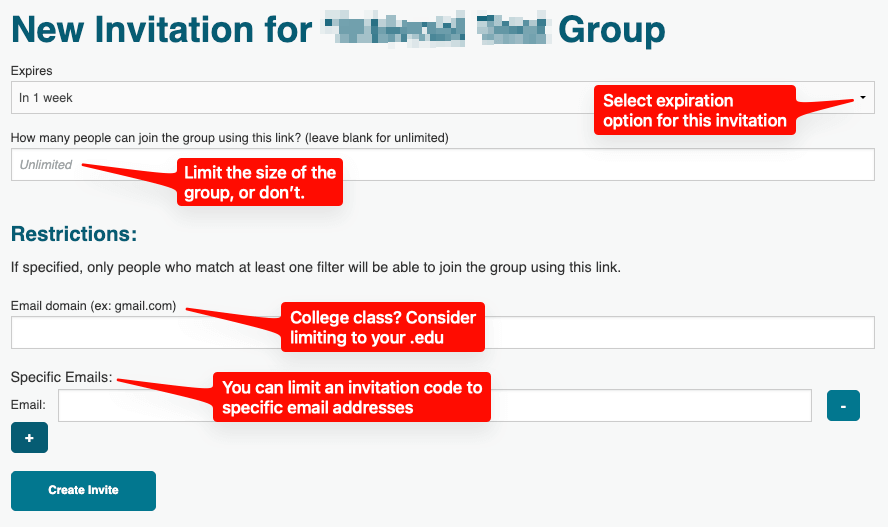
Puede decidir el nivel de apertura o restricción de cada invitación. Por ejemplo, podría ser:
- Abierta a cualquier persona que tenga el enlace
- Limitada en el tiempo
- Restringida a direcciones de correo electrónico específicas. (Útil si está asignando Ed100 como parte de un curso o de un grupo cerrado).
Puede crear códigos de invitación adicionales más adelante. ¡No tiene que hacerlo perfecto la primera vez! Así es como se ven las opciones de invitación:
Cuando haga clic en Create Invite verá una lista de sus invitaciones activas y caducadas. Los enlaces caducados aparecen en gris:
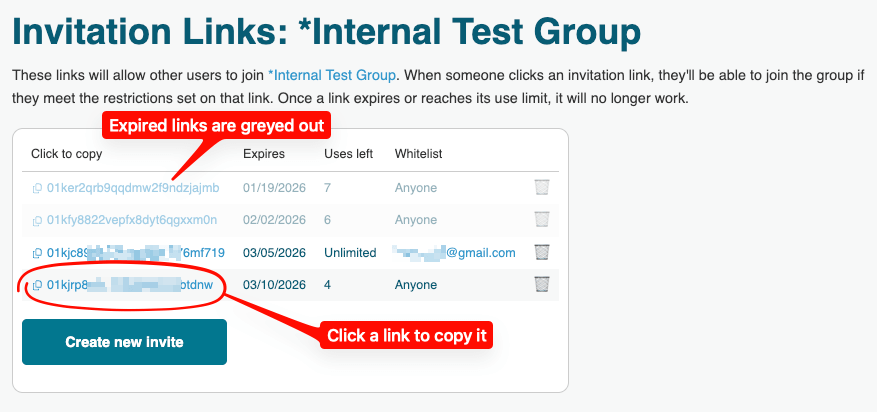
Haga clic en el enlace de invitación para copiarlo, luego péguelo en un correo electrónico, mensaje de texto, programa del curso, sitio web o en cualquier otro lugar.
Es solo una URL — compártala como prefiera.
Comparta su enlace de invitación de la manera que desee
Por ejemplo, envíe su enlace de invitación a personas en un correo electrónico o en un mensaje de texto. O en ambos. Podría insertarlo en la página del PTA de su escuela o en la página web del consejo de su PTA. Podría ponerlo en un programa del curso. Podría crear un código QR para su enlace de invitación y usarlo en una presentación. En resumen, puede enviar el código de invitación de la manera que desee — es solo una URL.
Aquí tiene un ejemplo de mensaje que podría copiar y pegar:
Paso 1: Regístrese en Ed100.org. Es gratis.
Paso 2: Use este enlace para unirse a nuestro grupo en Ed100: [ coloque aquí el enlace de invitación ]
Paso 3: Lea la lección 1.1 de Ed100 y tome el cuestionario para comenzar.
Ed100 explica el sistema educativo de California, una lección a la vez. Cada lección incluye un cuestionario. A medida que avanzamos por las lecciones, podemos apoyarnos mutuamente y celebrar el progreso hacia convertirnos en graduados de Ed100.
Celebrando el progreso
Los miembros de cualquier Ed100 Group pueden ver el progreso que cada miembro del grupo ha logrado para obtener su certificado de graduado. El informe interactivo enumera cada lección de Ed100, organizada por capítulo y marcada con colores para mostrar cuántos miembros han aprobado el cuestionario de cada lección. Así es como se ve:
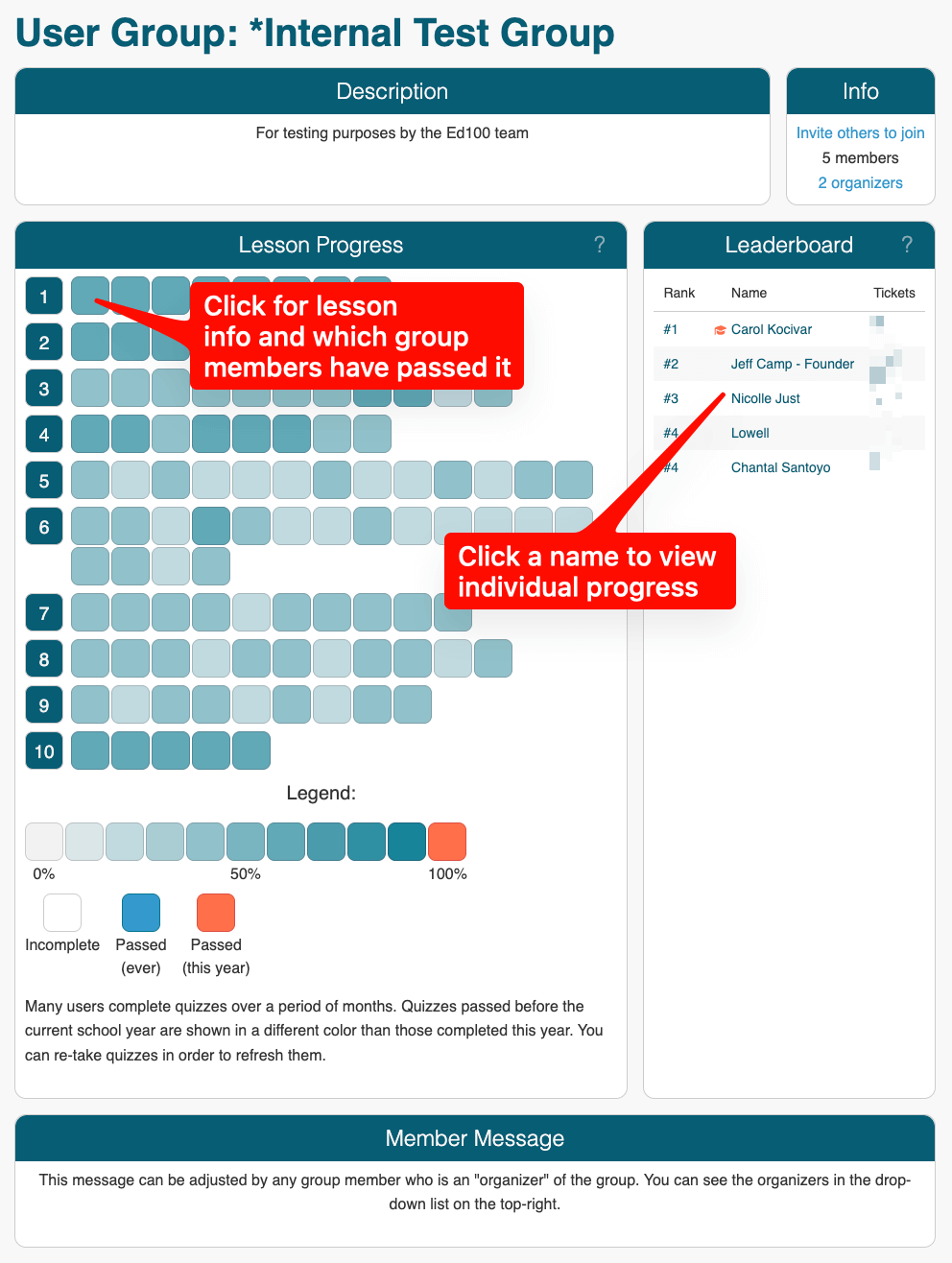
En la sección Lesson Progress:
- Haga clic en un recuadro de lección para ver su título.
- Vuelva a hacer clic para ir a la lección y tomar (o volver a tomar) el cuestionario.
En la sección Leaderboard:
- Haga clic en el nombre de un miembro para ver su progreso.
- Una corona indica un Ed100 Graduate.
Esperamos que las comunidades escolares revisen regularmente para celebrar el avance hacia la graduación.
Cómo compartir el liderazgo
Cuando crea inicialmente un grupo, usted es el único organizer del grupo, con permiso para editar la configuración del grupo e invitar personas. Para compartir ese rol con otra persona, asegúrese de que haya aceptado una invitación para unirse al grupo y luego asígnele el rol de organizer. Así es como se hace:
- Haga clic en el menú Ed100 Groups en la parte superior de cualquier página de Ed100.
- En el lado derecho, debajo de Actions, haga clic en la flecha desplegable. Elija Edit.
- En la lista de Members, seleccione a una persona y cambie la configuración a Organizer.
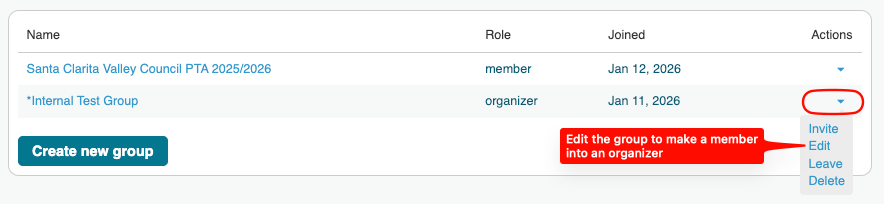
Los organizers pueden crear nuevas invitaciones para el grupo, editar la descripción del grupo, cambiar su nombre, eliminar miembros y eliminar el grupo. En general, conviene tener dos organizers, pero no demasiados.
Más cosas que debe saber
¿Cómo funcionan los tickets en Ed100?
Cada cuestionario que usted aprueba en Ed100 le permite ganar un ticket. Puede ver sus propios tickets en el menú View Lessons cuando usa Ed100 en una pantalla grande, o ir a su página de perfil personal. En su página de perfil personal también puede ver los cuestionarios que necesita volver a tomar para aprobar.
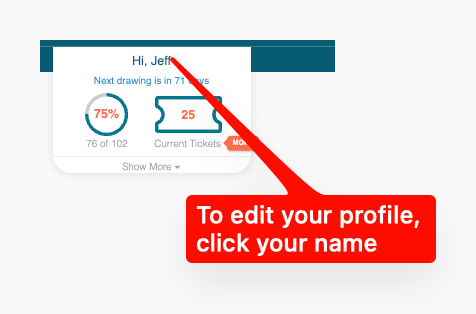
Los tickets de las lecciones que usted aprueba se reflejan en los leaderboards de los grupos a los que se une. (Solo muestra los que aprobó — solo usted puede ver los que respondió incorrectamente). Los colores en el leaderboard indican si cada ticket se obtuvo en el año escolar actual o en uno anterior.
Hacia el final de cada año escolar hacemos un sorteo, luego reiniciamos el Leaderboard para el año siguiente. Muchos usuarios obtienen tickets a lo largo de varios meses, a menudo atravesando un año escolar en el camino hacia la graduación. Para efectos del sorteo y del leaderboard, cada ticket cuenta para el año escolar en el que se obtuvo. Cada nuevo año escolar, usted puede volver a tomar cuestionarios y obtener nuevos tickets si lo desea.
¿Qué significa ser un Ed100 Graduate?
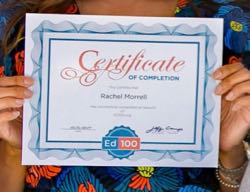
El certificado de graduado de Ed100
Cuando usted aprueba el cuestionario de cada lección en Ed100, se convierte en un Ed100 Graduate. Similar a un diploma universitario, es un reconocimiento permanente — una vez que se convierte en un Ed100 Graduate, siempre será un Ed100 Graduate. No tiene que aprobar todos los cuestionarios dentro de un solo año escolar.
Para descargar e imprimir su certificado, visite su página de Profile en Ed100. Nos encantaría ayudarle a celebrar su logro en redes sociales. ¡Tómese una selfie con él y envíenosla!
¿Puede ser miembro de más de un Ed100 User Group?
¡Sí! Puede tener sentido formar parte de varios Ed100 Groups, especialmente si usted es organizer o líder. Por ejemplo, un líder de un consejo de PTA podría ayudar a crear Ed100 Groups para varias unidades de PTA. Un educador podría encontrar práctico crear varios Ed100 Groups para diferentes cohortes de estudiantes. Una organización estudiantil podría crear leaderboards para diferentes cohortes por año o regiones.
¿Puede cambiar su Username en Ed100?
Sí, está en su Profile. Cambie su Nickname para cambiar cómo se le identifica en sus Ed100 Groups.
¿Puede ver Ed100 user groups de los que no es miembro?
Si usted conoce la URL de un Ed100 Group del que no es miembro, hay algunas cosas que puede ver: la descripción pública del grupo, estadísticas agregadas de finalización de lecciones para el grupo en su conjunto y los Nickname(s) de los organizer(s) del grupo. Para información a nivel individual debe ser miembro del grupo.
Etiquetas de esta publicación
Todas las etiquetas
Academia Khan Acoso acreditación Actitud Administradores Agallas Álgebra Ambiente escolar Aprendizaje Aprendizaje Ampliado Aprendizaje basado en proyectos Aprendizaje socioemocional Artes Asistencia Asociación de Maestros de California Asociación de Padres y Maestros Atención plena Ausencias Bonos de obligación Brecha de desempeño Burbank Calidad Calificación de escuelas Calificaciones en pruebas Cambio Canción Carol Dweck Carrera Cerebro Certificación CHAMP Ciencia Cierre de escuelas Civismo Comparaciones nacionales Concurso Consejeros Consejo escolar Control local Costo de educación Creatividad Crecimiento económico Crucigrama CSBA Currículo común cursos de estudios étnicos Datos Después de clases Día de la Independencia Diálogo dislexia Distritos Diversidad Dotado DREAM Act EACH EdPrezi EdSource EdTech Educación bilingue Educación del carácter Educación especial Educación religiosa Educación sexual Educación universal Elección Elección de escuela Enlaces guía Equidad Escasez de maestros Escuelas católicas Escuelas chárter Escuelas comunitarias Escuelas en casa Escuelas Magnet Escuelas privadas Escuelas religiosas Esfuerzo Estándares Estudiantes en riesgo Estudiantes que están aprendiendo inglés estudiantes sin hogar Estudios étnicos Evaluación Evaluación nacional de progreso educativo Éxito Federal Filantropía Financiamiento Financiamiento local Fondos por categorías Fundaciones educativas Ganadores Gastos Gobierno local Gráfica Grupos de presión Guía para padres líderes Historia Horas de oportunidad Huelga Humanidades Impuestos Impuestos a la propiedad Impuestos prediales Índice de desempeño académico Indignación Indocumentado Inflación de calificaciones Infraestructura Iniciativas Instalaciones Internacional Investigación Jerga Kindergarten La Ley Brown LCFF Lectura Ley Cada Estudiante Triunfa Ley Que Ningún Niño Se Quede Atrás Liderazgo Límites de distritos Litigación Lotería Maestros mantequilla de cacahuate Mapa Mapa del sitio Marcador Matemáticas Medios de comunicación Mejoramiento Continua Mito Mitos Motivación Motivación estudiantil Negociación colectiva Negocio Niñez temprana Noticias falsas Nutrición Organizaciones de gestión para escuelas chárter Padres Pandemia Participación de los padres Pedagogía Pensiones personalizado PISA Plan de responsabilidad de control local Planificación Plantilla Población Pobreza Política Política federal Políticas Premio Prescolar Presupuestos Prezi Proposición 13 Proposición 98 Propósito de la educación Pruebas Pruebas estandarizadas Reclutamiento de maestros Reforma Requisitos ag Responsabilidad Resumen del año Retención de maestros Rigor rompecabezas Rúbrica de evaluación Rúbricas Salario de maestros Salud Salud mental Se necesita ayuda Serrano vs Priest Sindicatos Sorteo SPSA STRS Sueño Suicidio Superintendente Suspensiones Tablero Talento Tamaño de clases Tareas escolares Tasas de graduación Tecnología Tecnología en la educación Tiempo dedicado a la tarea Tiempo en la escuela Trump Universidad Vacunación Vales Valores Vapeando Verano Vídeo Voluntariado Voluntarios Voto Voz del estudiante¡Compartir es vivir!
Restablecer contraseña
Buscar aquí en el contenido del blog y todas las lecciones.
Iniciar sesión con correo electrónico
We will send your Login Link to your email
address. Click on the link and you will be
logged into Ed100. No more passwords to
remember!









Preguntas y comentarios
Para comentar o responder, por favor inicie sesión .